TABLE OF CONTENTS
ADMIN PRIVILEGES REQUIRED
Overview
With the Stack Internal Community GitHub integration, GitHub URLs for file blobs, gists, pull requests, and commits will unfurl in Stack Internal Community questions and answers.
Your Stack Internal Community site must allow outgoing connections to GitHub over HTTPS port 443. An on-premises GitHub Enterprise server must be publicly accessible over the Internet. If it's behind a VPN or otherwise inaccessible, link unfurling will not function.
Configure GitHub
The GitHub integration requires a GitHub user to act as a bot account for the instance. You'll create a new GitHub bot user account for Stack Internal Community and generate a personal access token for this user.
-
In GitHub, create a user account for the Stack Internal Community bot.
-
Log into GitHub as the GitHub bot user (verify your email address if required).
-
Click on the profile photo in the upper-right corner of any page, then click Settings.
-
In the left-hand menu, click Developer settings.
-
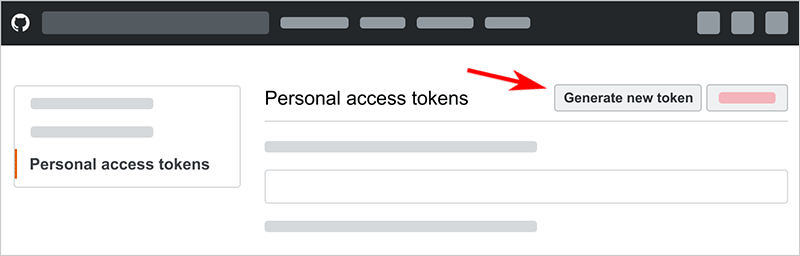
Click Personal access tokens, then Generate new token.
-
On the new personal access token page, add a note describing the purpose of the token (for example: "Stack Internal Community").
-
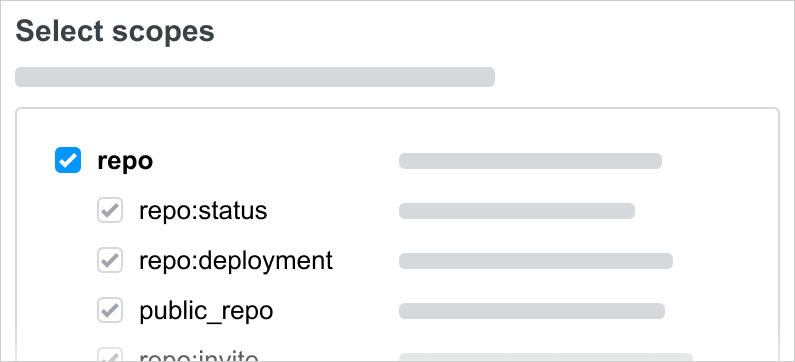
Check repo to give the token code repository access.
-
Click Generate Token.
-
If your organization requires SSO to authenticate into GitHub, you'll need to authorize the token.
- In GitHub, click Configure SSO next to Stack Internal Community user token you just created.
- In the dropdown menu, locate your organization and click Authorize.
-
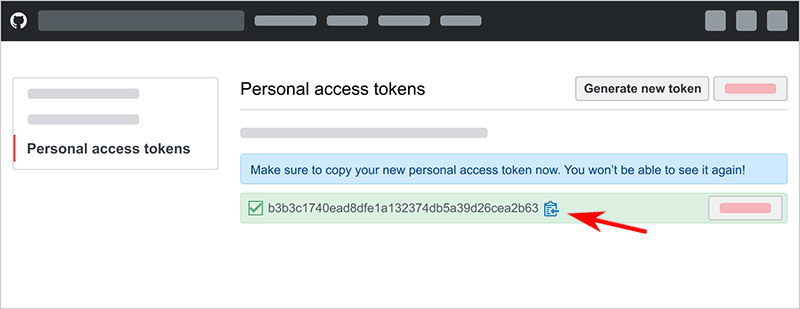
On the personal access tokens screen, copy the token. You won’t be able to see the token again after you leave this page. If you leave the page before copying the token, you'll need to create a new one.
Configure Stack Internal Community
You'll complete the GitHub configuration in Stack Internal Community. The process will differ slightly depending on whether you're using GitHub or GitHub Enterprise.
-
After logging into Stack Internal Community as an administrator, click Admin settings in the left-hand menu. Click GitHub under the "INTEGRATIONS AND APPS" heading.
-
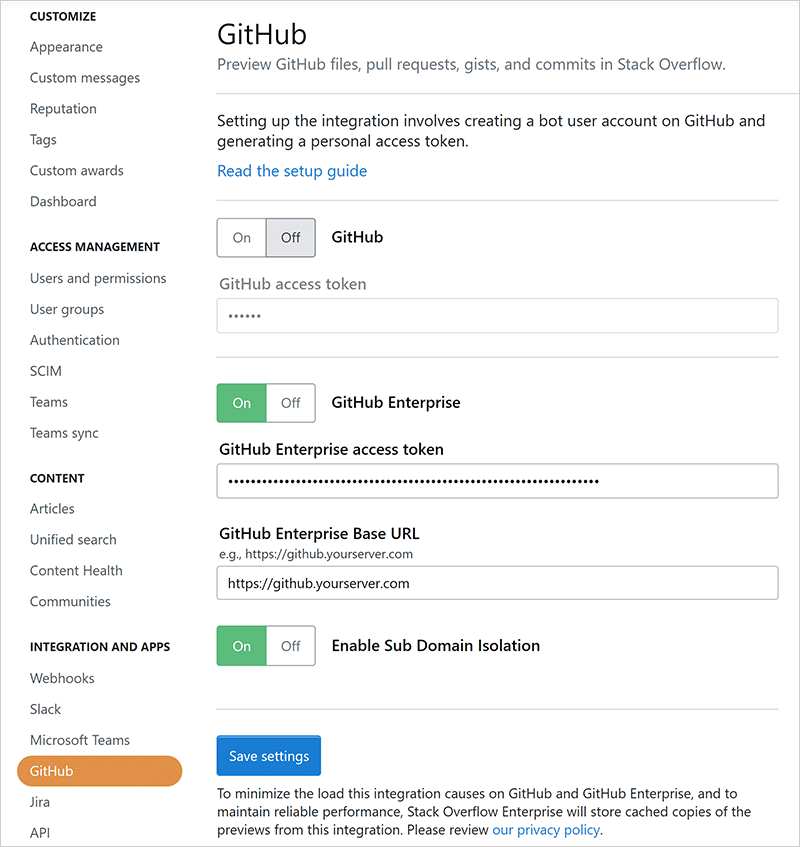
Click the On toggle corresponding to the type of GitHub integration you're using (GitHub or GitHub Enterprise). GitHub Enterprise is pictured below.
-
Paste the token you created in Github into the appropriate ...access token box.
-
If using GitHub Enterprise:
- Enter your GitHub Enterprise base URL. This will be the URL of your instance (if self-hosted) or https://github.com (if GitHub-hosted).
- If you use subdomain isolation on your GitHub Enterprise instance, set Enable Sub Domain Isolation to Yes.
-
Click Save settings.
The GitHub integration should now be active, showing previews of new GitHub URLs for file blobs, gists, pull requests, and commits in questions and answers. GitHub links in existing questions or answers will not be previewed until someone edits the post.
Stack Internal Community will only preview GitHub URLS that appear on their own line in the question or answer.